 GridEon
Runs locallyPV 3,47 kWBattery 45 %Grid 0,69 kW
Your solar system, seen clearly, straight from a Raspberry Pi.
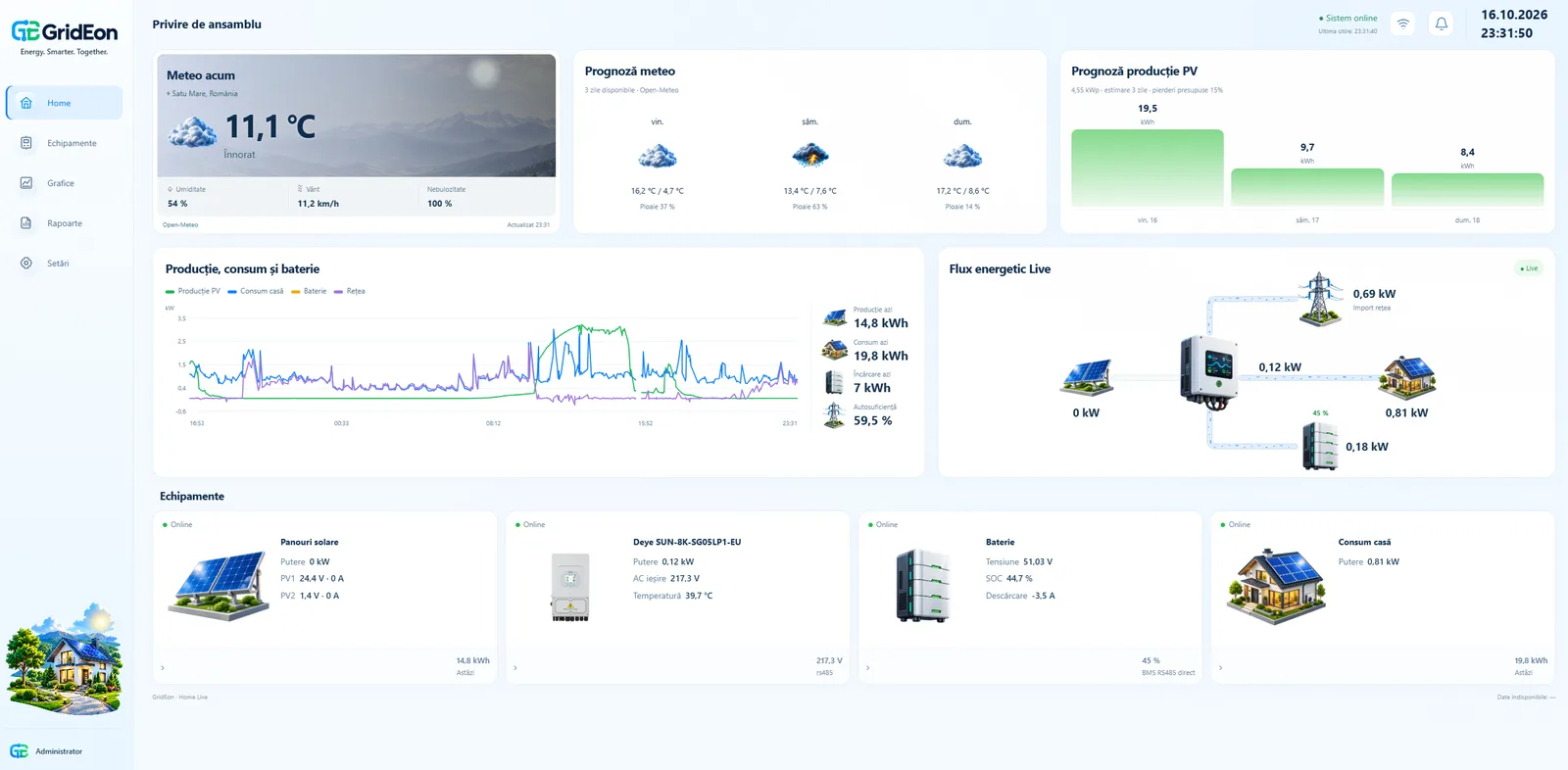
GridEon reads data straight from your inverter and BMS and shows live power flow, production, consumption, battery status, grid import and export, weather forecasts and historical reports. Everything runs at home, no mandatory cloud.
Features
Everything your system does, on one screen
Live power flow
Panels, inverter, battery, house and grid, refreshed every few seconds, with energy direction.
Detailed charts
Production, consumption, battery and grid, plus voltage, current and power for each MPPT.
Reports and CSV export
Daily and monthly totals for the last 30 days and 12 months, with CSV export and import.
Weather and PV forecast
Production estimate for the next 3 days, calculated for your panels' power and orientation.
MQTT and Home Assistant
Built-in MQTT broker, so you can send data to Home Assistant or other apps.
Local, no mandatory cloud
Your data stays on your device and you open it on your own network. Internet is only needed for activation and access from outside your home.
Compatibility
Works with popular inverters and BMS
Flexible drivers over RS485, Modbus and USB.
Other devices
Runs on
Different model? Get in touch, the list keeps growing.
How it works
From box to charts in three steps
Write the image to a card
Download the GridEon image from your account and write it to a microSD card. See the guide.
Connect your devices
Wire the inverter and BMS over RS485 or USB and pick them in Settings.
Open in a browser
Activate your licence once, then follow your system from phone or computer.
Pricing · coming soon
Per-device licence, no mandatory subscription
Launching soon. Leave your email and you'll hear first, with a launch offer.
- Online account with your licences and sites
- Updates and new drivers included
- Multiple sites in one account
FAQ
Frequently asked questions
Do I need internet for it to work?
Only to activate the licence and to reach your system from outside your home. Otherwise GridEon runs locally and you open it on your own network (LAN), no internet needed. The weather forecast updates whenever a connection is available.
What hardware do I need?
A Raspberry Pi 4 or an equivalent Orange Pi, a microSD card and a USB–RS485 adapter for the inverter and BMS. The full list is in the docs.
Can I check my system remotely?
On your home network, yes, from any browser. Secure access from anywhere, straight from your GridEon account, is in development.
Does it work with Home Assistant?
Yes, via MQTT. GridEon includes an MQTT broker and publishes data for Home Assistant and other apps.
Can I use one licence on several devices?
Each licence activates on one device. All your licences and sites show up in the same account.