 GridEon
Docs / Inverters
Growatt (SPF, SPH, MIN, MOD)
GridEon reads Growatt inverters through the manufacturer's Modbus protocol: SPF / SPE off-grid, SPH / SPA hybrids, MIN, MOD and MID from the TL-X (on-grid) and TL-XH (with battery) series, plus older on-grid units (MIC, MIN TL-XE). You pick the series under Model; each series has its own registers.
| Model in GridEon | Connection | Inverter port |
|---|---|---|
| Off-grid · SPF ES / ES Plus · SPE ES | USB (or RS232 on older SPF) | USB type B, at the bottom |
| Hibrid · SPH / SPA (BL-UP) | RS485 | RS485-2: pin 5 = A, pin 1 = B |
| Hibrid · SPH TL3 BH-UP | RS485 | the free RS485 port on the COM board (A / B marked); see the manual |
| MIN / MOD / MID · TL-X and TL-XH | RS485 | SYS COM or RS485: pin 3 = A, pin 4 = B |
| Older on-grid · MIC, MIN TL-XE | RS485 | RS485 (A / B marked on the terminals) |
The USB port on hybrids and on-grid unitsOn SPH, SPA, MIN, MOD and MID the USB port (where the ShineWiFi dongle goes) isn't used for GridEon. Only the SPF and SPE are monitored over USB.
SPF and SPE off-grid · over USB
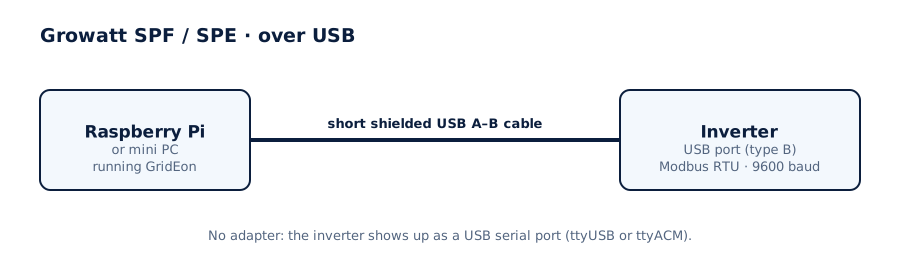
- Connect the inverter's USB type B port (at the bottom) to a USB port on the GridEon device. A short, shielded cable with a ferrite works best.
- In Settings → Inverter choose the Growatt brand, the Off-grid · SPF ES / ES Plus · SPE ES model and the USB · straight into the inverter connection.
- The inverter shows up as a serial port (
/dev/ttyUSB…or/dev/ttyACM…). Pick it, then Test connection and Save.
Older SPF with an RS232 portIf the inverter has an RS232 (DB9) socket, use a USB–RS232 cable and the RS232 · serial cable connection, 9600 baud.
SPH, SPA, MIN, MOD, MID · over RS485
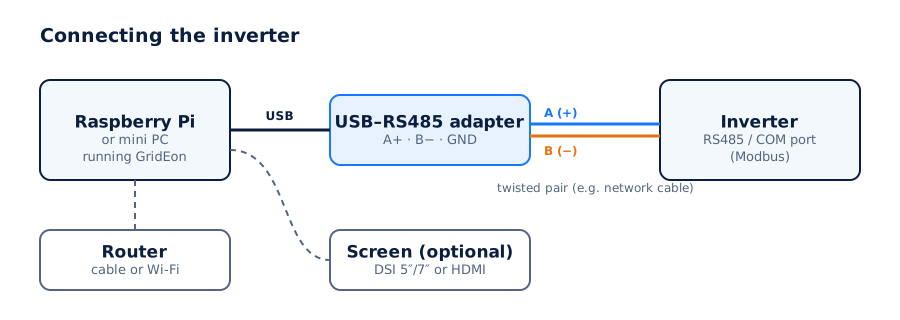
- Use a USB–RS485 adapter (FTDI or CH340 chip) and a network cable (twisted pair).
- Use the RS485 monitoring port from the table above, not the meter or battery terminal. GND isn't needed.
- Wire A on the inverter to A (+) on the adapter and B to B (−). GND only if both have it.
- Plug the adapter into a USB port on the GridEon device.
In Settings → Inverter choose the Growatt brand, your series' model, the RS485 · Modbus RTU connection, the adapter's port, 9600 baud and address 1.
Several invertersEach inverter needs its own cable.
Settings you can change from GridEon
In Devices → Inverter, the Inverter settings panel reads settings straight from the inverter. Every change asks for confirmation, and after writing GridEon reads the value back to check it was accepted.
- SPF / SPE: output priority (SBU, SOL, UTI), charger source, grid hours, battery type, charging currents and voltages, AC input mode, buzzer, auto restarts.
- SPH / SPA: Battery First and Grid First, each with power, stop SOC and 3 time windows, grid charging and the EPS output.
- MIN / MOD / MID TL-XH: SOC limits for Load First, Battery First and Grid First, grid charging and the Time 1–9 windows (mode, hours, enabled).
- All grid-tied series: export limit (with the Growatt meter), max active power and the inverter clock.
CarefulSettings marked “risk” (grid, battery type, frequency) can stop the inverter or break grid rules. Only change them if you know exactly what you're doing.
Troubleshooting
- Settings change back on their own: if AI mode is on in ShinePhone, it can overwrite settings. Turn it off while you change settings from GridEon.
- SPF: the connection drops now and then: the USB port on some SPF units is sensitive to noise. Try a shorter shielded cable with a ferrite.
- The inverter stays Offline: check the port chosen in Settings and the cable. On RS485, swap A and B, it's the most common cause.
- The adapter isn't listed: unplug and replug it, then reload the settings page.
- You unplugged the cable: the inverter shows Offline with the reason; reading resumes by itself once you plug it back in.