 GridEon
Docs / Inverters
Solis (RHI / S5 / S6 Hybrid)
GridEon reads Solis (Ginlong) hybrid inverters from the RHI, S5 Hybrid and S6 Hybrid series, single- and three-phase, over the RS485 port, using the manufacturer's Modbus RTU protocol.
| RS485 | |
|---|---|
| What you need | USB–RS485 adapter + network cable |
| Inverter port | RS485 (S6: pin 4 = B, pin 5 = A) |
| Speed | 9600 baud, 8N1 |
| Modbus address | 1 (Settings → Address on the inverter display) |
Connecting over RS485
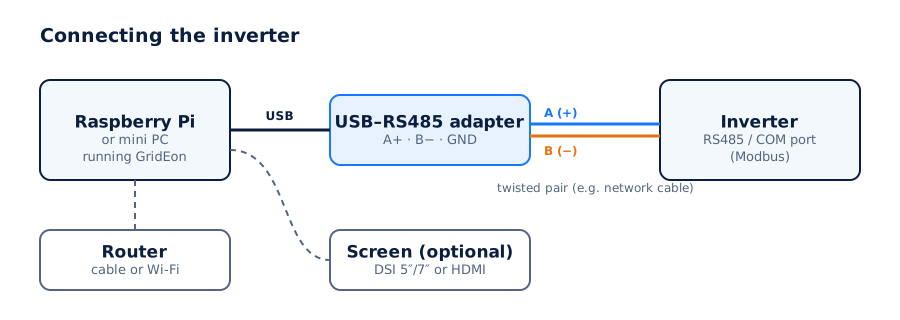
- Use a USB–RS485 adapter (FTDI or CH340 chip) and a network cable (twisted pair).
- Use the inverter's RS485 port (on the S6 Hybrid, an RJ45 plug): pin 4 = B (−), pin 5 = A (+). GND isn't needed. On other series check the pins in the manual.
- Wire A on the inverter to A (+) on the adapter and B to B (−). GND only if both have it.
- Plug the adapter into a USB port on the GridEon device.
In Settings → Inverter choose the Solis brand, the Hybrid · RHI / S5 / S6 model, the RS485 · Modbus RTU connection, the adapter's port, 9600 baud and address 1.
Several invertersEach inverter needs its own cable and a different Modbus address.
Settings you can change from GridEon
In Devices → Inverter, the Inverter settings panel reads settings straight from the inverter. Every change asks for confirmation, and after writing GridEon reads the value back to check it was accepted.
- Storage mode: Self-Use, Feed-in Priority, Peak Shaving or Off-grid, plus backup reserve, grid charging and Time of Use.
- Battery: max charge and discharge current, overdischarge SOC, force-charge SOC, off-grid overdischarge SOC; voltages for LV batteries without a BMS.
- Timed charge and discharge: currents and time windows.
- Grid export limit and max export power, the backup (EPS) output and the inverter clock.
CarefulSettings marked “risk” (grid, battery type, frequency) can stop the inverter or break grid rules. Only change them if you know exactly what you're doing.
Troubleshooting
- Solis dongle and GridEon at the same time: on some older dongle firmware, SolisCloud loses its connection while the inverter is read over RS485. Ask Solis for newer dongle firmware.
- The inverter stays Offline: check the port chosen in Settings and the cable. On RS485, swap A and B, it's the most common cause.
- The adapter isn't listed: unplug and replug it, then reload the settings page.
- You unplugged the cable: the inverter shows Offline with the reason; reading resumes by itself once you plug it back in.