 GridEon
Docs / Inverters
Voltronic / Axpert / MPP Solar / InfiniSolar / PowMr
Voltronic Power builds the off-grid and hybrid inverters also sold as Axpert, MPP Solar, InfiniSolar and PowMr (for example Axpert MKS / MKS II / MAX, VM III, MPP Solar PIP and MPI). They all speak the PI30 protocol, and GridEon reads them with one driver.
| USB | RS232 | |
|---|---|---|
| What you need | the USB A–B cable from the inverter box, no adapter | USB–RS232 cable (FTDI chip) for the RS232 / COM port |
| Inverter port | USB (type B) | RS232 / COM (RJ45): pins 1 and 2 = data (TX / RX), pin 8 = GND |
| Speed | — | 2400 baud, 8N1 |
Option 1 · Over USB (the simplest)
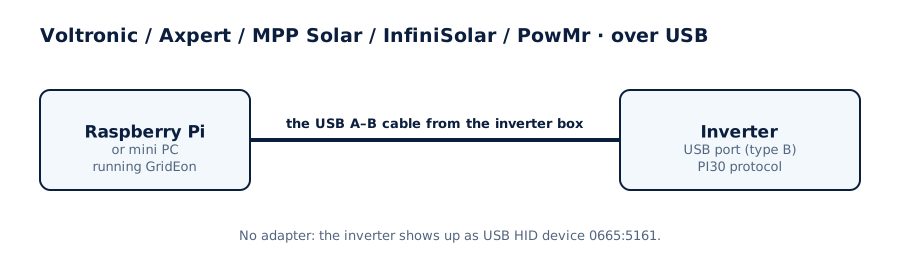
- Connect the inverter's USB port (type B, like on printers) straight to a USB port on the GridEon device, with the cable from the inverter box.
- In Settings → Inverter, choose the brand (Voltronic, Axpert, MPP Solar, InfiniSolar or PowMr) and the USB · straight into the inverter connection.
- Under “Inverter on USB” you'll see
/dev/grideon-voltronic. Pick it, then Test connection and Save.
Good to knowOver USB the inverter shows up as a HID device (0665:5161), not as a serial port. The GridEon image includes the system rule that makes it accessible and gives it the fixed name
/dev/grideon-voltronic.Option 2 · Over RS232
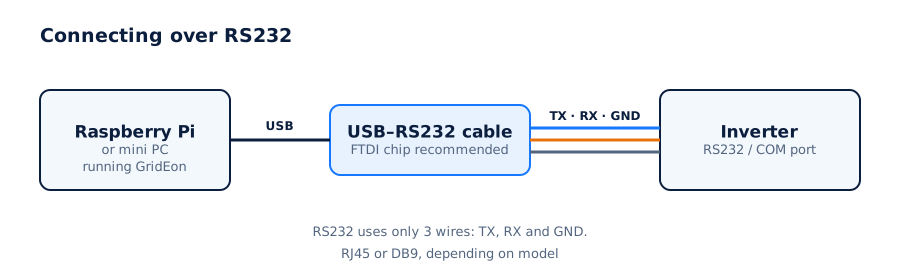
- Use a USB–RS232 cable made for Voltronic inverters (RJ45 plug at the inverter), or a DB9 one with the RJ45–DB9 adapter from the inverter box.
- Connect it to the RS232 / COM port at the bottom of the inverter and to a USB port on the GridEon device.
- In Settings → Inverter, choose the brand, the RS232 · serial cable connection, the cable's port and the speed 2400.
Good to knowUse one monitoring port at a time: USB or RS232.
Settings you can change from GridEon
In Devices → Inverter, the Inverter settings panel reads settings straight from the inverter. Every change asks for confirmation, and after writing GridEon reads the value back to check it was accepted.
- Output source priority (USB / SUB / SBU) and charger source priority.
- Battery: type, Bulk and Float voltages, cut-off voltage, back-to-grid and back-to-battery voltages.
- Max charging current and max utility charging current (allowed values are read from the inverter).
- Equalisation, AC input range, output frequency and on/off functions (buzzer, display, auto restarts, bypass).
CarefulSettings marked “risk” (grid, battery type, frequency) can stop the inverter or break grid rules. Only change them if you know exactly what you're doing.
Grid powerThe PI30 protocol doesn't report grid power. When the inverter runs on the grid, GridEon works it out from load, PV and battery and marks it “estimated”.
Troubleshooting
- Nothing shows up over USB: try another USB A–B cable; some cables carry power only.
- The inverter stays Offline: check the port chosen in Settings and the cable. On RS485, swap A and B, it's the most common cause.
- The adapter isn't listed: unplug and replug it, then reload the settings page.
- You unplugged the cable: the inverter shows Offline with the reason; reading resumes by itself once you plug it back in.